Revision History
Revision History is an Omeka S module that keeps an edit history and audit trail of your items, item sets and media: who changed what, and when, with every value before and after. You can undo a save, restore a deleted item as it was, and see what any batch edit, import or API call actually did.
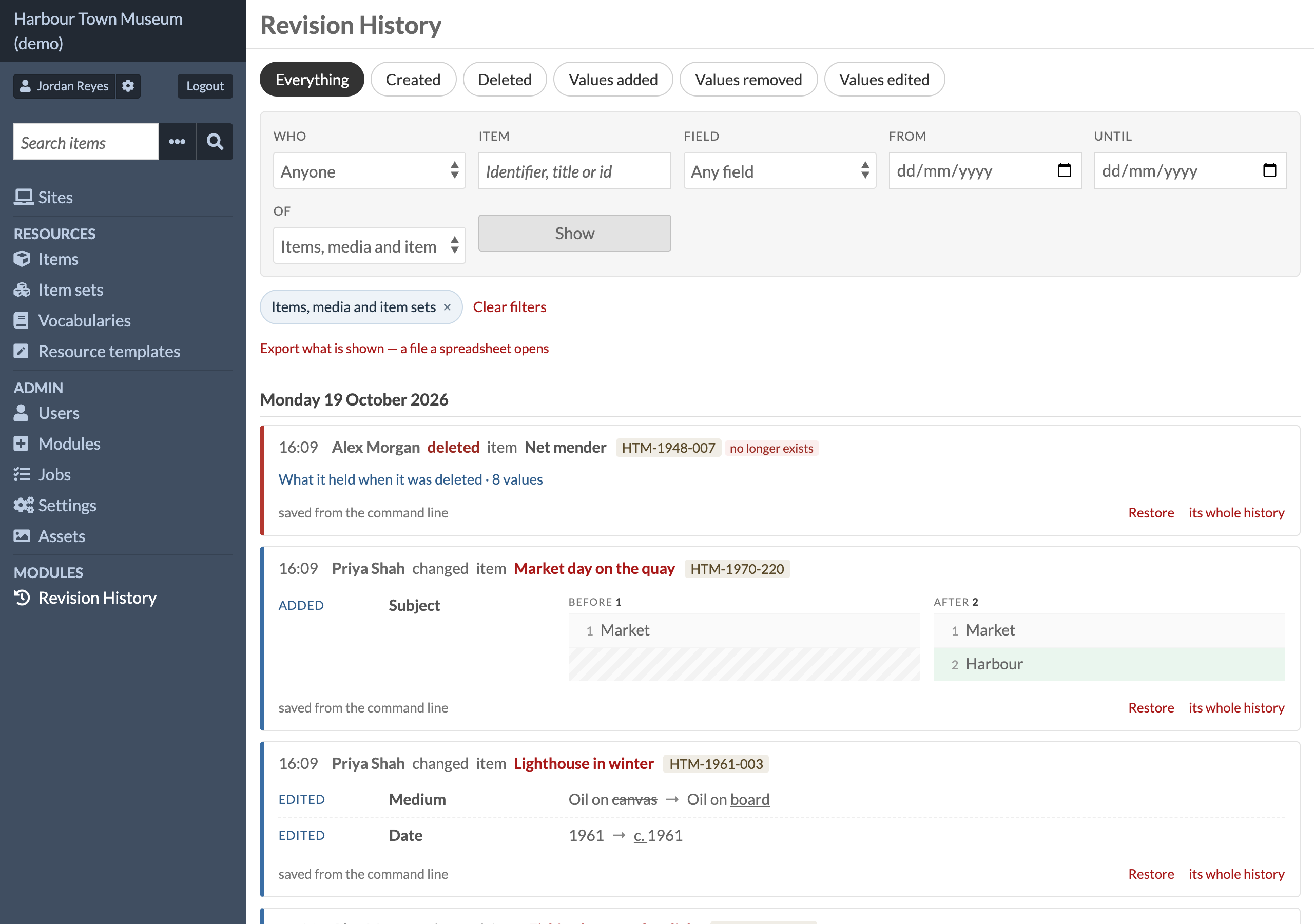
It answers, in words a person can read:
- who created an item, and when
- who deleted an item, and what it held
- who added, removed or edited a value — with the value before and after
It records every save that goes through Omeka — the admin forms, the REST API, batch edit,
background jobs and other modules — and keeps it in its own tables
(revision_history_event, revision_history_change). It works alongside Activity Log,
History Log and Log without replacing them, and can import what Activity Log and History Log
recorded before it was installed.
- Omeka S 4.x · no other module required
- Works with Batch Values and Vocab Sync when they are installed (see below)
- Licence: GPL-3.0-or-later (see
LICENSE) - Issues and questions: https://github.com/phumraphee/RevisionHistory/issues
Screenshots
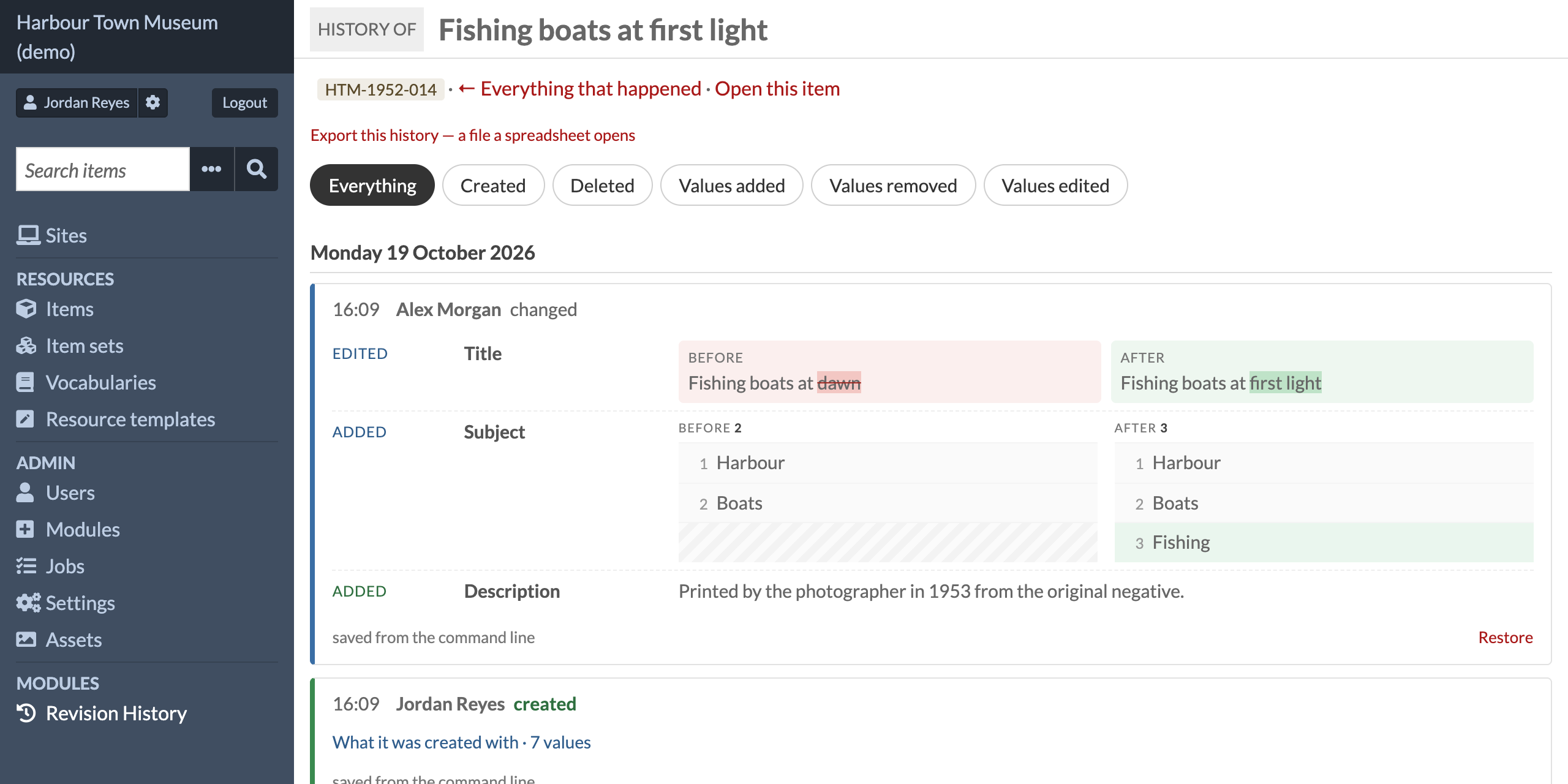
One item's whole history — each save with what was edited, added or removed, and a link to put it back:
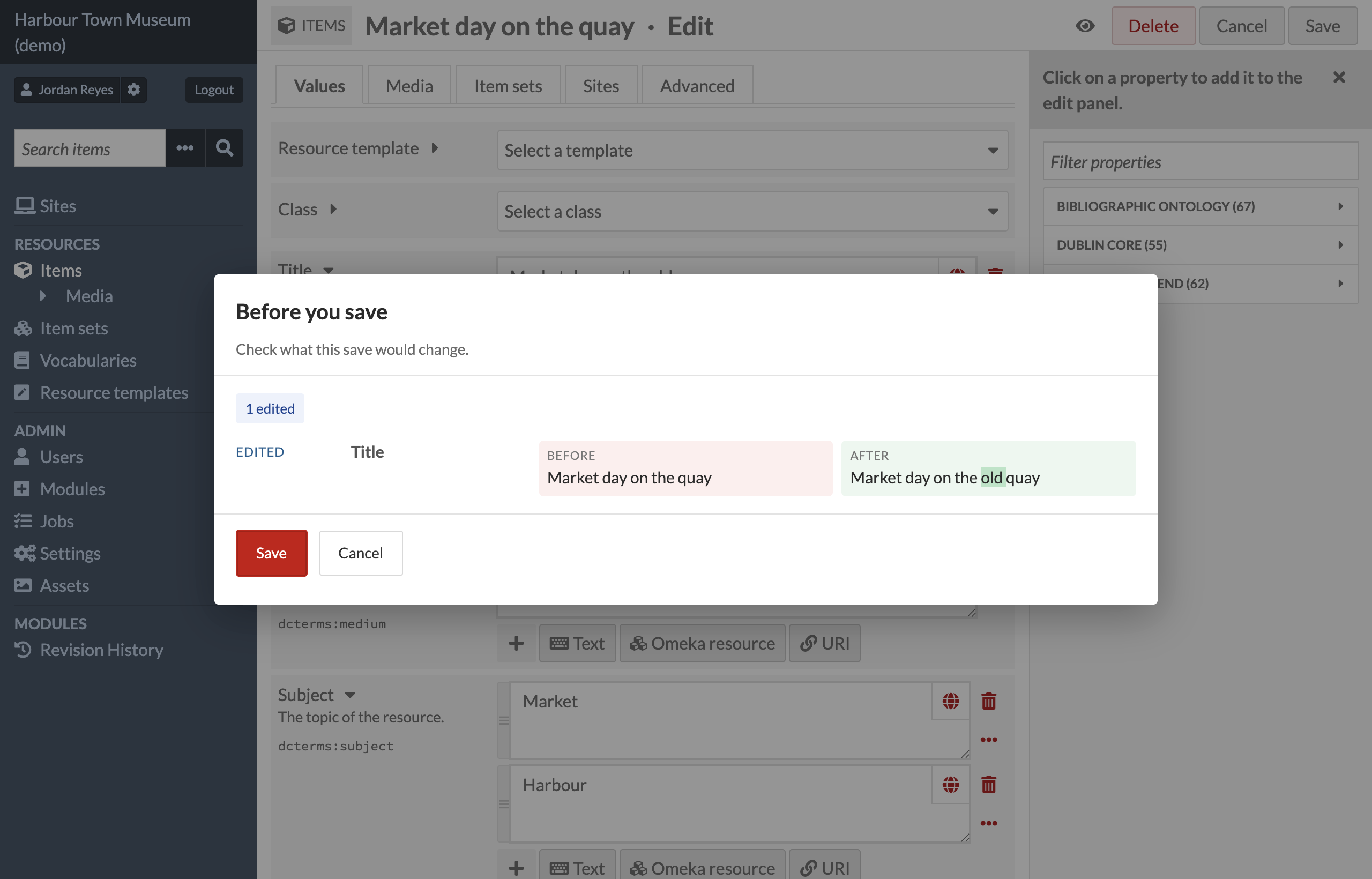
Before you save — the edit form shows what the save would change, and asks:
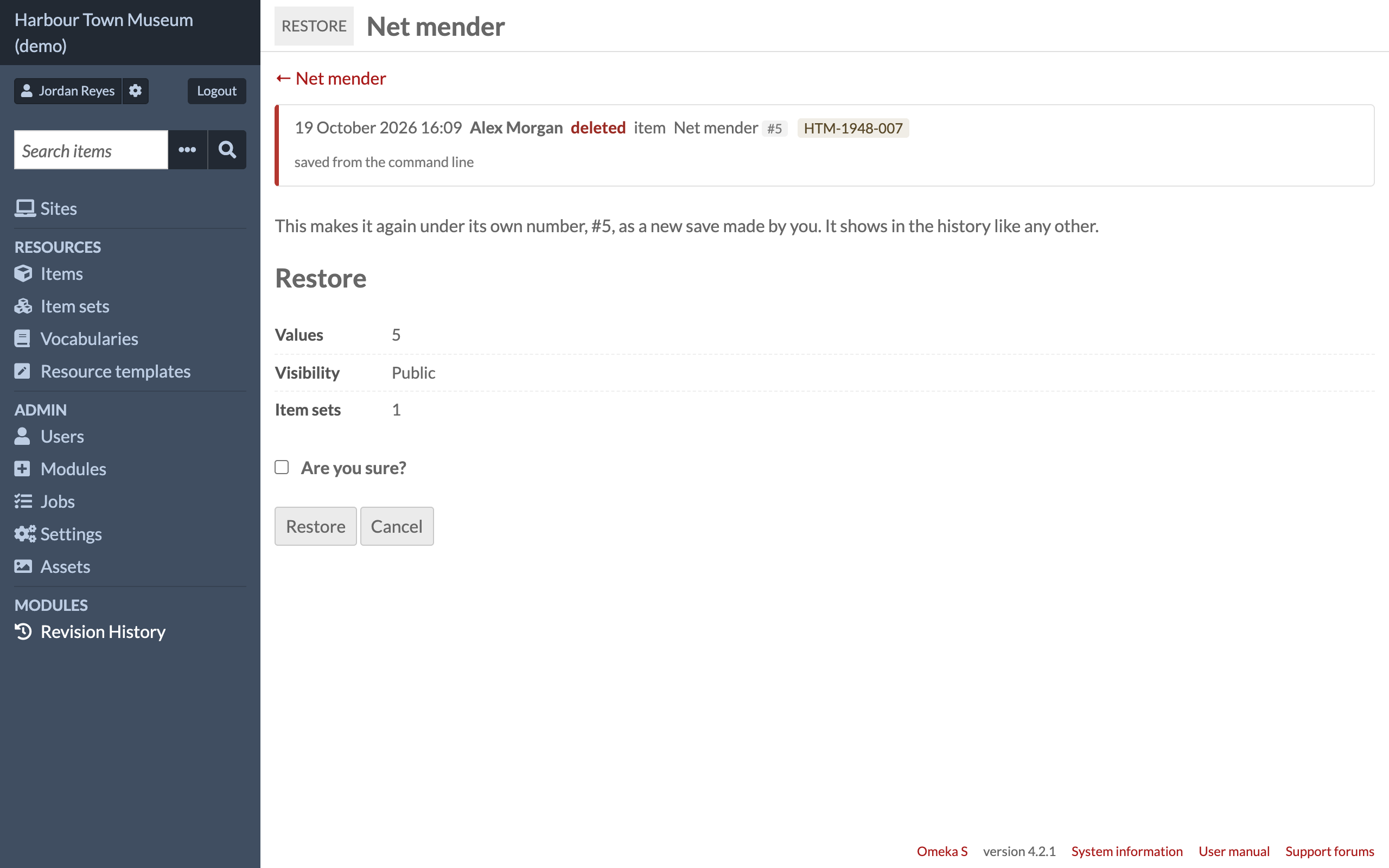
Restore a deleted item — as it was when it was deleted, under its own number:
All screenshots are from a demo site with made-up people and objects.
Where to find it
- Admin → Resources → Revision History (under Items and Batch Values since 1.0.5; it was under Modules) — everything, newest first, grouped by day. Six buttons for the questions; filters for who, item (identifier, title or id), field, dates, and items / media / item sets.
- An item's admin page — the last five changes in the sidebar, and a link to its whole history. Since 1.0.8 a change to one of the item's media names the file, and a change made from the command line reads "a script (name)", since scripts usually run as an admin account. A media's page also says who added the file and when — Omeka's Owner of a media is the item's owner at the time the file was added, which is often not the person who uploaded it — or, for files added before the history began, that this was not written down.
- Revision History → Copy the history kept by History Log and Activity Log (global admin).
How it records
A Doctrine onFlush / postFlush listener. Every save through Omeka passes there:
the admin form, the REST API, batch edit, background jobs, other modules that use the API.
- A field that holds more than one value is written down whole as well — both sides, in order — beside the lines that say what happened to each value. A line on its own cannot say what the field still holds, which is the question somebody reading the history actually has, and when the values look alike one line says nothing at all. The history page draws that whole, exactly as the dialog before a save draws it. Nothing is written down less: this is one row more. Putting a save back reads the lines, not the picture.
- before is read from the tables at
onFlush, after atpostFlush, and the two are compared field by field. Values that are on both sides did not change; what is left is paired in order as edits; anything still left over was added or removed; same values in a new order is a reorder. - Visibility, resource template, class, owner, item sets, sites, thumbnail, primary media and the order of an item's media are recorded too; for an item set, whether it is open; for a media, its source, alt text, language, media type, HTML, and its file by fingerprint (sha256) and size.
- What a resource held when it was deleted is also kept whole (
revision_history_snapshot), so it can be made again. - A media added to an item or taken from it writes the item down again too (its list of media, and its primary media when the database empties it), so the data check does not report a change nobody made (1.0.9).
- A write that cannot go through Omeka's entities (a module's or a page's own SQL) can be written down like a
save:
\RevisionHistory\Outside::fromServices($services)->around([$id, …], $write, $note)reads the resources before and after the write and records what changed, with who and how (1.0.10). - Another module can say what a change means, in a few words shown beside the values: see "Describing a change" (1.0.11).
- A note on a value (value annotation) is part of that value: changing the note is an edit of that value — a note added, its text changed, one of its values made private or public, a value added to it or taken out of it, the note removed. The page names the value it hangs on and says what happened as a note on that value's field, with the note's words (Note on Dimensions: added 'A4.', Note on Year (Source): edited '1961' → 'c. 1961', Note on Title (Description): 'note' Public → Private; the note's own field in brackets when it is not the value's) (1.0.12); each note value shows its language and Private as a value of its own field does (1.0.3). Putting the save back puts the note back with the value.
- Image Annotate annotations (table
image_annotate_media) are followed by each annotation's own id: added · edited (body text or selector) · removed, shown under the field name Image Annotate and the module's own keyo-module-image_annotate:annotation. A deleted media keeps the annotations it had. - Values that link to a deleted item are removed by the database (
ON DELETE CASCADE) without Doctrine knowing; the items holding those links are read in the same save and get their own entry. The same goes for what the database carries into resources when an item set, a site, an asset, a template, a class, an account, a field or a whole vocabulary is deleted. - What an item held when it was deleted is read at
api.delete.pre(andentity.remove.preas a fallback), before any other module: History Log flushes from inside each media's removal, which would otherwise delete the item's values one save early — before the item's own removal event is even reached. - A flush that starts inside another flush (History Log does this) records nothing; the outer one does.
- Ids are kept, words are looked up when the page is drawn: a renamed Vocab Sync term, template or linked item shows its current name; one that is gone says so.
- Anything else saved through Omeka (a template, a vocabulary, a site, an account, a setting, a
module, an API key) is recorded from Doctrine's own change set, field by field, under the name
Omeka gives it. A row that has no name of its own but says something about a resource — where an
item set sits in the item sets tree (
item_sets_tree_edge, the table Item Sets Tree keeps and Item Sets Tree Manager writes to) — is named after that item set and shows on its history page too. Reordering one level of the tree writes every item set in it. That is read as a level: the item sets of that level, in order, before the save and after it, written as one entry and shown the way a field of many values is — the whole level, both sides, with the one that really moved marked. The rows of the single edges are still written; they sit inside the card. - A media put into another item — splitting an item, or putting the media back — is written as
o:item: the item it came from and the item it is in now. The item it left is read as well, so its own record is not left saying nothing happened to it. - Who: the signed-in account, with name and email copied at that moment. How: the admin pages (and which one: Omeka's own page title — Edit item, Batch edit items…; for a module's page, the label that module gives it in its own admin navigation config, found by matching the saved address against Omeka's router; otherwise the address) · API (which key — never the secret half) · background job (id and class) · command line.
- When two sides of an edit read the same on the page (a link whose kind changed, a note, a language), the entry says in words what differs.
-
Nothing here can stop a save. A failure is written to Omeka's log and shown at the top of the page to global admins. An entry and its lines are written together or not at all.
-
What a media keeps besides its file: for an HTML media the HTML itself, and for everything else one line per name, under the name the ingester or the module gives it.
Not seen at the moment it happens: a module that writes the tables with its own SQL, bypassing
Omeka; anything that happened while this module was not active. Both are found afterwards: each save
is written down as a number (revision_history_digest), and a resource that no longer matches the number recorded
for it gets an entry saying so — at the next check, or at the next save of that resource, whichever
comes first.
A link saved with its exact data type
Omeka has two ways of saying the same thing: resource, which does not say what kind of
thing is linked, and resource:item, resource:itemset and resource:media, which do.
Batch Values, when it is set to (its Save a link with its exact data type), or any other module
or script that tidies data types, may turn the first into the second as a resource is saved — so somebody who changed one word can find
a dozen lines under their name saying the data type of a link changed, which they never
asked for. Every one of those is written down row by row like any other change; the card
gathers them into one line — 3 links saved with their exact data type · resource →
resource:item — so they do not bury the change that was made, and a field whose only
change was that is not drawn as a whole field either. The spreadsheet, the filters and
Putting a save back see every row as it is.
With Batch Values and Vocab Sync
Both are optional. Without them, nothing below appears.
Batch Values. A run of Batch Values carries its
number (bv:5) with the request itself, so there is nothing to guess, and the card also shows,
in Batch Values' own words, what that run says it did, read from its own record (which this module
only reads). Some work leaves little behind in the tables: turning a picture leaves a new file and
nothing else, so the record says the file changed and the run's own line says "Turn: Upside down".
A run that puts another run back says "Cancels #5".
Batch Values also puts buttons in Omeka's add and edit pages that sort the values of a field, or
move and copy them to another field, there and then. Pressing Save afterwards is an ordinary save:
on its own the record reads oddly — a value moved is one taken out of one field and another added
to a second, and nothing says why. So the form carries one field saying what its buttons did
(batchvalues_form_actions), and that sentence is kept with the entry: With the Batch Values
buttons on this page: 4 value(s) moved from “Subject” to “Description”. It is read, not believed:
the lines of the entry are still what really changed.
Vocab Sync. A Vocab Sync value is kept in the table as the term's number and sent back by the form as the term's label, so before anything is compared the label is put through the same question Vocab Sync itself asks — the label first (a term may be called "1961"), then the number. Without that, every Vocab Sync field of the resource would read as changed. Putting a save back sends Vocab Sync values by the term's label when that label leads back to the same term, by its number when no label reads like that number, and otherwise not at all (the page says so). Vocab Sync's own record of what was done in it (terms made, renamed, retired) can be copied in and shown here, and the history page can be filtered to it.
Saves that were refused
Omeka puts a token in every admin form and checks it when the form comes back. When that check fails the person is shown Invalid or missing CSRF token, the save never reaches anything, and nothing else would say it was ever tried — pressing Save again usually works, which is what makes it hard to find.
So every admin form is looked at as it arrives, with the same question Omeka is about to
ask, and when the answer is no the state of that moment is written to revision_history_refused:
whether the token came at all, how many tokens the session holds and how many it once held,
a name of this module's own for the session and when this module first saw it, how many
fields this server read out of the form and how many bytes the browser sent, and the
server's own limits. Those few numbers tell the causes apart —
| what is seen | what it means |
|---|---|
| bytes sent, no fields read, and that many bytes is over this server's limit | the body was larger than this server accepts |
| bytes sent, no fields read, but well under the limit | said as that and nothing more |
| fields read = this server's limit | it stopped reading the form partway, and the token is its last field |
| session younger than the save | the session was replaced between opening the page and saving |
| session holds fewer tokens than it once did | something wrote over the session |
| none of these | the token sent was not one this session knows |
and what the person was saving is kept beside it, so a refused save costs nobody their work. The page is Revision History → Saves that were refused; a person sees their own, a global admin sees everybody's. The form's own token is never kept, and neither is any field whose name says it is a password, a key or a secret.
Only forms are looked at — what a browser sends when somebody presses a button on a page, and the only thing Omeka puts a token in. A page that sends JSON to a module's own address is not one: PHP reads nothing into the form there, which would look exactly like a form this server threw away, and those requests carry their own protection.
Nothing here changes the request. It reads, writes one row, and adds one line above Omeka's own message saying the work was kept; whatever it finds, the request goes on as it would have.
An entry written by something else
Some changes cannot go through Omeka at all: its API has no way to replace the file of a media, so a picture replaced on disk by a script of your own would leave a silence here exactly where the most consequential change was. For that there is a door, the same one the copies of History Log and Activity Log come through. Writing an entry through it is supported and will keep working; what follows is the whole of it.
revision_history_event, one row: happened_at, action (created/edited/deleted),
resource_id, resource_kind (item/media/item_set), item_id (a media's item),
title, accession, user_id, user_name, user_email, via + via_detail (how it
arrived and from where), note (one sentence in your own words, shown under the lines),
n_added/n_removed/n_edited, and:
source— who wrote the entry.hereis this module;historylog,activitylog,vocabsyncandwatchare its own. Pick a word of your own for anything else; the page shows it as "recorded by". source_ref— your own reference for the change, unique within yoursource(turn:412).sourceandsource_refare unique together, so writing the same entry twice cannot make two.
revision_history_change, one row per thing changed: event_id, ord (from 1), op
(added/removed/edited/order), field (o:file, o:alt_text, or a term like
dcterms:title), property_id (a term's property, otherwise null), before_json and
after_json.
Each of those two is one value, as one JSON object — not a list, and not a shape of your own:
{"type":"literal","value":"<sha256> · <bytes> bytes","uri":null,"vr":null,"lang":null,"pub":1}
type is the data type (literal, uri, resource:item, vocabsync:<id>…), uri the
address of a link, vr the id of a linked resource, lang the language, pub 0 for a
private value. For a setting rather than a value (o:is_public, o:owner) it is
{"id": 4} instead, and for an order row a list of those. A shape this does not know
is drawn as empty, with "changed in a way this page cannot show" beside it.
Where the change also altered the media or resource row (a new sha256 and size, say),
write the entry and the data check will see the difference is accounted for and say
nothing. Never let a failure to write here fail the work itself.
Many values at once
around() reads every record before and after the write. For a job that rewrites thousands of values in one
statement and keeps each value's old content itself (an import and its undo), hand over a query over that record
right after the write instead:
\RevisionHistory\Outside::fromServices($services)->valuesRewritten(
    'SELECT value_id, resource_id, property_id, old_type AS before_type, old_value AS before_value
       FROM example_import_log WHERE import_id = ?',
    [$importId],
    'import 12 undone',
    ['run' => 'example:import:12', 'automatic' => false]
);
One row per value: value_id, resource_id, property_id, before_type, before_value, and if you kept them
before_uri, before_value_resource_id, before_lang, before_is_public (a column left out keeps what the value
holds now). before_type NULL: the write added that value. A value the write deleted is put back from the row.
One entry per record, the same lines a save would have; returns counts and the time it took.
As one entry (1.2.2). valuesShared() takes the same arguments and writes ONE entry for the whole statement
instead of one per record — for a rewrite of thousands of records, a few seconds instead of a minute. Each
different change (field, value before, value after) is one line of the entry, however many records got it; each
record gets one row in revision_history_shared that says which lines are its own, with its name as it was. So
records whose changes differ — another field, another term, a language, a link instead of words — keep exactly
their own lines. A record's page shows the entry as its own, with only its lines, and Restore there puts back only
those, for that record. The Everything page shows one card with the records under it. The data check's numbers
are written down for all of them together; their full copies (when the archive keeps one) are made again by the
next check. Check for it with method_exists($outside, 'valuesShared') and fall back to valuesRewritten().
around() takes the same $opts as a fourth argument: run (up to 40 characters, one card for the job) and
automatic (nobody was behind it: folded away on the page until asked for).
Entries from other modules
Not everything that happens to a record is a value. A work goes out to the conservator and comes back; a
person checks that it is kept in the right place; a set it belongs to is moved in a tree. Since 1.2.0 the
module that did it can write that into the record's history, so the record's page shows everything in one
place. (A value your module writes by plain SQL is something else: wrap the write in Outside::around(), above,
and the values are recorded as a save.)
if (class_exists(\RevisionHistory\Entries::class)) {
    \RevisionHistory\Entries::fromServices($services)->add([
        'resource'   => 123,                     // an item, media or item set (or 'resources' => [ids])
        'module'     => 'ExampleLoans',          // your module's folder name
        'label'      => 'Loans',                 // the word on the card and on the filter
        'kind'       => 'returned',              // your own word: a-z 0-9 . _ -
        'kind_label' => 'Returned',              // that word as people read it
        'summary'    => 'Returned from the loan to Example Gallery',
        'before'     => 'On loan',               // optional, text
        'after'      => 'In storage',            // optional, text
        'details'    => ['Condition' => 'unchanged'],   // optional, label => text
        'link'       => '/admin/example-loans/42',      // optional, "Open in Loans →" (a path of this site)
        'undo'       => '/admin/example-loans/42/undo', // optional, "Undo in Loans →"
        'ref'        => 'loan_event:42',         // your own row: the same ref is never written twice
    ]);
}
Without depending on this module, send the same keys as an event; with no module listening, nothing happens:
$events = new \Laminas\EventManager\EventManager($services->get('SharedEventManager'), ['HistoryEntry']);
$events->trigger('history.entry', null, [/* the same keys */]);
- Code beside Omeka that shares its database without starting it (a page of your site, a script) can write the
same entries through a plain PDO, so one entry does not cost starting the application:
\RevisionHistory\Entries::beside($pdo, ['id' => 5, 'name' => 'A. Person', 'email' => 'a@example.org'], ['web', '/page.php'])->add([...]). That code says who is signed in and how the request came (weband its path, orcliand the script), so it must already know; nobody signed in: mark the entryautomatic. - Who, when and how are filled in by this module, as for a save; a module cannot set them. Something with
nobody behind it (a scheduled run) is
'automatic' => true, with'actor' => 'name of the job'; it is kept and folded away on the page behind Show automatic (n). - Each entry is a copy that reads on its own. The words, both sides, the details, the person's name and
the record's name are written down as they are. Nothing on the page asks your module: when it is uninstalled,
or the record deleted, the entry still reads the same, and its links say module removed. A page of your site
that is not a module says
'origin' => 'page'; its link is kept while the file is there. - Undo stays with you. The card shows your Undo link; this module never undoes an entry. When you undo,
write the undo as an entry of its own with
'undoes' => '<the first ref>', and the first card says undone … by …. - Copying an old log in, from the command line only, an entry may also carry
'at'(UTC,Y-m-d H:i:s),'by_id','by_name','by_email'and'copied_from', with aref; running the copy again adds nothing. add()returns the entry's id and never throws: if it cannot write, your work stands and the reason is logged. Inside your transaction the entry is part of it. One request writes at most 5,000 entries; the rest are counted (Entries::folded()) and logged — unless the call says otherwise:addMany($entries, ['limit' => 0]).- One entry about many records (1.2.2):
addShared($entry)takes the same keys with'resources' => [ids]and writes one entry, not one per record — a term renamed on 8,000 records citing it is one row, plus one row per record inrevision_history_shared, written in the database in one pass. Every record's page shows it, with the record's own name kept with its row; the Everything page shows it once, with its records. Therefis the entry's (no#idper record); the same call again writes nothing. No limit per request. It needs 1.2.2: check withmethod_exists($entries, 'addShared'). - Never put personal data of people outside the archive in an entry (a visitor's name or address): name the case ("Loan request 12") and link to where it is kept.
php modules/RevisionHistory/bin/entries.php listcounts them by module and kind;remove <module> [ref prefix] [--go]takes them away, only when a person asks it to.
Describing a change
Some changes mean more than their two sides show: a flag inside a value's JSON, a field of its own in a media's data, written by another module. Since 1.0.11 that module can say, in a few words, what such a change means, and the history shows it beside the values.
Before an edit is drawn — on the history pages, an item's card, the dialog before a save — the
event revision_history.describe is sent on the identifier RevisionHistory, with these
parameters:
| Parameter | What it holds |
|---|---|
field |
the field, as a term (dcterms:subject) or a name (o-module-image_annotate:annotation, o:media_type …) |
op |
edited |
before, after |
the two sides, exactly as written down (for a value: type, value, uri, vr, lang, pub, note; for an Image Annotate annotation also raw, the annotation as the module keeps it) |
change |
the whole line of the history |
entry |
the resource it is about (resource_id, resource_kind, item_id), when the page knows it; null in the dialog before a save |
A listener answers with a short phrase, either by returning it or by setting the parameter
description. The first answer wins. Nobody answers, or the answer is empty: the line is drawn as
it always was. A listener that throws is ignored. The answer is shown as text, never as HTML.
// In your module's attachListeners():
$sharedEventManager->attach('RevisionHistory', 'revision_history.describe', function ($event) {
    if ($event->getParam('field') !== 'o-module-image_annotate:annotation') {
        return null;
    }
    $was = $event->getParam('before')['raw']['example:hidden'] ?? false;
    $now = $event->getParam('after')['raw']['example:hidden'] ?? false;
    if ($was === $now) {
        return null;
    }
    return $now ? 'Annotation hidden' : 'Annotation shown';
});
The history itself is not changed by this: what was written down stays as it was, and a listener added or removed later changes only how the line reads.
Putting a save back
Links and their other side (1.0.7). A restore asks the Inverse Properties module, when it is installed, to keep the other side of each link it puts back — as Omeka's own item form does on every save. That module only ever adds, so a link that a restore takes away keeps its other side, as after the form.
Never in one click. A global admin may put back any save. Since 1.0.5 a site admin or editor may put back a save of their own, as long as nobody has saved that item, media or item set since: Restore shows on their own entries, and the page refuses anybody else's save, or one that a later save has built on (putting it back could take the other person's work with it — that call is a global admin's). Bringing back something deleted stays global admin only.
- Restore on an entry that changed an item, media or item set: the page shows what would be put back and what would not (changed since · already there · no longer exists · cannot be put back here), and nothing is written until "Are you sure?" is ticked. It is done through Omeka's API, as a new save by the person who pressed it, and the whole resource is sent (Omeka keeps no id on a value, so sending one field alone would empty the others). Afterwards the resource is read back and any field that does not read as it was meant to is named.
- Restore on an entry that deleted an item, media or item set: it is made again under its own
number — the resource's own row is written directly (only
resource,item,item_set,media, and only when their columns are the ones this module knows), everything else goes through Omeka. Media added from a URL are downloaded again with Omeka's own downloader and file store; each media's URL is tried before anything is written and the page says, media by media, what cannot come back and why (an uploaded file — only its name was kept; a URL that no longer answers). Item sets, sites, the order of media, the primary media, alt text, Image Annotate annotations and the links other resources had to it come back too.
Copying from the other logs
History Log, Activity Log and Log all DROP their tables on uninstall.
- Copy — their rows, unchanged, into
revision_history_copy_history_event,revision_history_copy_history_change,revision_history_copy_activity_log_event. Safe to repeat. Activity Log rows about user account changes are not copied: they contain password hashes. - Entries — made from the copy, only for what happened before this module was installed
(setting
revision_history_from); after that, this module's own record is the one shown. - History Log keeps the new value but not the one it replaced. Replaying its events per item works the replaced value out when the item's earlier values are known; when they are not, the entry says so.
- History Log's
createdis in the database's time zone; the offset is measured againstresource.created(UTC) on the same creations. - Activity Log keeps who and when, not what changed. Its entries say that.
- Image Annotate: History Log never saw its annotations. Activity Log kept the whole request of each media save, and Image Annotate stores exactly the annotations that request sent, so consecutive saves of one media are compared. The first save seen for a media cannot be compared with anything, and its entry says so.
- The same save from two sources within two minutes is shown once. Activity Log is checked against every History Log event — including the many in which History Log found nothing changed — so a save History Log looked at and found empty does not come back as "changed, details unknown". Entries an earlier copy made that way are taken back on the next run (the raw copy is not touched).
- A copy runs as one background job at a time (a MySQL lock). The copy page shows its progress, and says so when a job stopped — including a job Omeka still calls "in progress" whose process is gone. Pressing again carries on from where it stopped.
- If a module is installed again its table starts from id 1; that is detected and nothing more is copied from it, so two histories are not mixed.
Before you save
On Add new, Edit and Batch edit the page shows what the save would change, and asks, before making it. It is the same comparison the history is written from, rendered by the same helper, so the dialog and the history page can never disagree: the whole field is shown, what it holds now beside what it would hold, with the value that moved marked and the places numbered. A file the form no longer carries is named, because a save that quietly drops a file is what this is for.
Nothing here can stop a save. The script asks the server only after every other listener on
the submit has run (Omeka's own fills values_json there, and its check of the required
fields stops the save there), and any error, any slow answer — anything at all — lets the
form through unchanged. It never blocks a save, it only delays one.
Before you leave. Pressing Cancel, or following the navigation menu, with work nobody has
saved shows the same list of changes again, under Before you leave, with three buttons:
Save, Leave without saving, Keep editing. Only links that certainly leave are stopped — the
Cancel button, the navigation menu, the header, the page's own actions — because the admin
pages are full of links with real addresses that Omeka answers itself without leaving, the
plainest of them the next page of the panel for picking an item to link to. And Leave presses
that same link again rather than sending the browser to its address, so a link that turns out
not to leave still does its own work and nobody's work is thrown away. Omeka's Cancel is an anchor to nothing that steps
back in the history from its own handler, so that click is stopped outright rather than only
having its default taken away; the hidden values_json is filled first by running the form's
own submit handlers without submitting (jQuery's triggerHandler), because outside a real
submit it still holds what the page was drawn with — which would read as every value removed.
Leaving from here silences the browser's own question, so nobody is asked twice.
When the check cannot be made (1.0.5). Before you leave asks the server what would be lost. If that request fails, or no answer comes within the wait (8 seconds), the link is still followed — but Omeka's own unsaved-changes warning is now left on, so the browser asks Leave this page? before typed work goes. Until 1.0.4 that path switched the warning off too, and a slow or unreachable server meant leaving without anybody asking. When the server answers that nothing would change, the form is left at once, as before.
Signed out while the form was open (1.0.5). When the session has run out — the day's
timeout, or somebody signing the account out from Active Sessions — Omeka answers the check
with its sign-in page. Until 1.0.4 that page appeared inside Before you save, and Save then
sent the form to the sign-in page and lost what was typed. The check now always says how many
changes it found (X-Revision-History-Changes); an answer without that line, or one that was
redirected, is taken as signed out: nothing is sent, the form stays as it is, and a box says so
with a link to sign in again in a new tab. Before you leave treats it like a check that could
not be made — the link is followed with Omeka's own warning left on.
Closing the tab and the back button cannot be caught that way, and there the browser's warning
is the only one there is. Omeka has one, but it decides from the form's named fields, and the
boxes a value is typed into have none. So this marks the form as touched (Omeka.markDirty,
its own call) the first time somebody really types in it, which makes that warning appear.
Making a value private (the eye) and removing a value count too: they are links, not fields,
and change the form without a word, so a real press on one of them marks the form the same way
and Cancel asks Before you leave (1.0.2). A click made by a script does not count.
Cancelling the save dialog also takes Omeka's "submitted" mark off the form again, so the
warning is not lost after a save that did not happen.
Somebody else saved first (1.0.4). Omeka has no lock on an edit form: a form left open saves the whole resource as it stood when the page was drawn, and whatever somebody else saved in between — on another admin form, through the API, from a background job or another module's page — is put back without anyone noticing. So the form remembers the last line of the resource's history (and its modified time, for a save the history did not record) when it is opened, and the check before saving says, above the list of changes, who saved it since, when, and how. The list below it already shows their work being undone; this says why. Saving is still the person's choice — the dialog only says so. A form that would change nothing is not asked about, since saving it loses nothing.
Read before saving over it (1.0.5). When the check names a save made since the form was
opened, Save stays off until a box is ticked that says whose save and when: I have read that
this undoes Anna's save of 14:02 (and how many others). It is not a refusal — saving over it
is still the person's choice — but not a press made without reading. And where the warning is
on, a check that cannot be made (the request fails, or no answer comes within the wait) is
no longer taken as "nobody else saved": the box says Could not check whether somebody else saved
this, offers Check again (nothing is reloaded, nothing typed is lost), and Save anyway
needs the same tick. Until 1.0.4 a failed check saved at once. With the warning switched off
(revision_history_confirm_stale), a failed check still lets the save through as before.
Modules → Revision History → Configure turns it off (revision_history_confirm), and the
warning on its own (revision_history_confirm_stale). Omeka lets only a
global administrator open a module's settings. The history is kept either way.
What another module can rely on
Another module that asks its own question before a save needs to know whether this one is already asking, or nobody is asked twice. Two things are meant to be read from outside and will not change without saying so:
window.RevisionHistoryConfirm— set on the add and edit pages of items, media and item sets, and only when the question is switched on.urlis where the page asks what the save would change;kindisitem,mediaoritem_set;modeisone, orbatchon the batch edit pages, where this asks a shorter question of its own;selectoris the form it watches. When the question is off, the object is not there at all — then another module should ask as it normally would.jQuery(form).data('omekaFormSubmitted')— Omeka's own mark, which this sets to true on every watched form just before it presses the link again for Leave without saving. A handler that stood aside to let this ask can read it as "asked and done", and take the click that second time.
The click for Leave without saving is the page's own link pressed again, not an address this module goes to. Whatever another module's handler does with that link, it does.
Uninstall
Leaves every revision_history_* table and the settings in place, on purpose, and notes the time — the
entries other modules wrote (revision_history_entry) too.
Installing again notes the gap on the page. To remove the history for real, drop revision_history_* by hand.
Settings
Modules → Revision History → Configure (global admin):
- Check before saving (
revision_history_confirm) — whether the admin pages ask before a save. Default on. - Title field (
revision_history_title_term) — the property read as a resource's name on the history page. Defaultdcterms:title. - Identifier field (
revision_history_accession_term) — the property whose first value is shown beside the title (an accession or call number) and can be searched. Defaultdcterms:identifier; empty for none.
Set without a form:
revision_history_from— when this module started keeping its own history (set once, at first install).
Requirements
Omeka S 4.x (Doctrine DBAL 2.11 or newer, which Omeka 4 ships). PHP 7.4+. MySQL 8 or MariaDB.
Who may see it
Global admin, site admin, editor, reviewer. Copying, checking and bringing back what was deleted: global admin. Putting a save back: global admin, and a site admin or editor for their own save while nobody has saved over it (1.0.5).
Which address is recorded
Each entry keeps the address the request came from (ip), as Activity Log does.
- When the web server sees a public address, that address is kept, and the
CF-Connecting-IPandX-Forwarded-Forheaders are ignored: anyone could have written them. - When the web server sees a private address (10.x, 172.16–31.x, 192.168.x, and the like),
the request is taken to have come through a reverse proxy such as Cloudflare or a proxy on
the same network. The visitor's address is then read from
CF-Connecting-IP, or else from the first address inX-Forwarded-For.
If your Omeka is reached directly on a local network, with no proxy in front of it, a computer on that network can send those headers itself and have any address written down. The address is then only a hint, not proof of who made a change; the account that made it is recorded separately and does not depend on it.
Personal data
Every entry records the account that made the change: its id, name and email address as
they were at that moment (so the history still reads correctly after an account is removed),
and the address above. Save forms refused by Omeka's security check are recorded with the
account's id and name, the page, the browser's description and the fields that were sent —
never the form's token, nor any field whose name says it is a password, a key or a secret. Nothing is sent
anywhere; it stays in the revision_history_* tables of your own database, which uninstalling
does not drop. If your site must answer requests to remove personal data, include those tables.
Tests
php tests/run.php— comparing before and after, replaying History Log, marking text differences (combining marks such as Thai vowels and tones stay with their letter). No Omeka needed.tests/integration/— real saves through a real Omeka with History Log, Activity Log and Log installed.
Licence
Copyright (C) 2026 Phumraphee Sae-tang
This program is free software: you can redistribute it and/or modify it under the terms of
the GNU General Public License as published by the Free Software Foundation, either version 3
of the License, or (at your option) any later version. See LICENSE.