Omeka S Code Snippets


Manage PHP snippets from the Omeka S admin interface, without editing a theme or writing a module for every small change. Inspired by the WordPress Code Snippets plugin as a functional and UX reference; it does not copy that source.
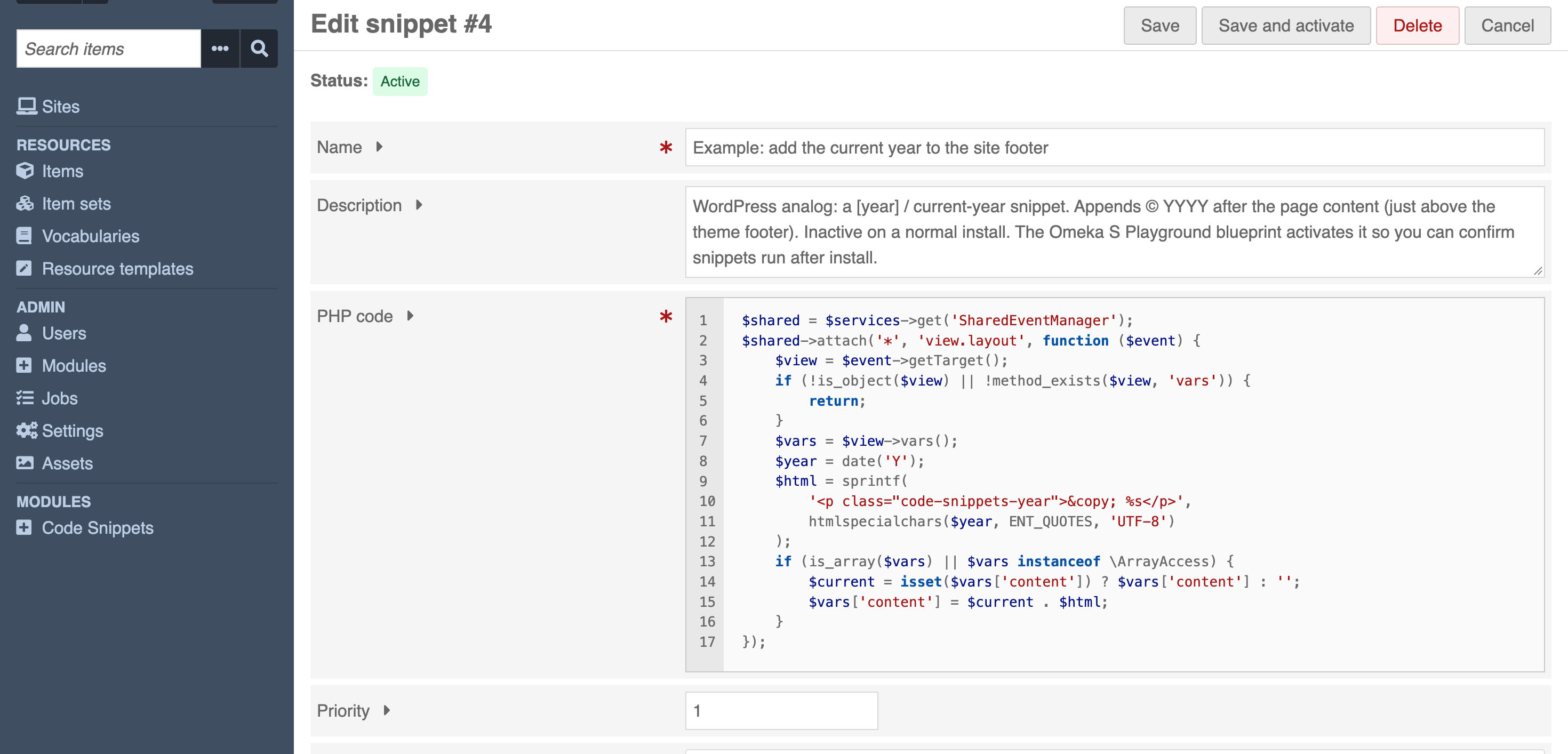
What it does
- Create, edit, enable, disable, prioritize and delete PHP snippets from the admin
- Run location per snippet: everywhere, only in the administration area, or only on the public site
- Priority to control execution order
- Editor with PHP syntax highlighting and line numbers (CodeJar, vendored locally, no CDN calls)
- Syntax is checked before a snippet can be activated, so broken code is never stored as active
- Runtime errors are captured and shown next to the snippet instead of breaking the page
- Example snippets included, all inactive
- Safe mode kill switches to recover from a snippet that breaks the site
- Optional REST API at
/api/code_snippets, reads only unless writes are enabled - Optional HMAC authentication of executable snippet state against direct database tampering
Snippets run with the privileges of the Omeka S PHP process. Only global_admin may manage them by default; other roles can be allowed in the module configuration, with the consequences described in who may manage snippets. Read the security model before using this on a production site.
Installation
Requirements:
- Omeka S 4.1 or later (
omeka_version_constraint = ^4.1.0) - PHP 8.0 or later
Install like any Omeka S module:
- Copy the
CodeSnippetsdirectory intomodules/CodeSnippets, or uploadCodeSnippets-X.Y.Z.zipfrom the admin modules page. - In Admin → Modules, install Code Snippets.
install()creates thecode_snippettable and inserts several example snippets, all inactive. Disabling the module does not delete snippets.
The examples are Omeka S versions of well-known WordPress Code Snippets / WPCode demos (lowercase upload names, hide the admin/user bar, hide the version number, current year in the footer). They do not run until a global administrator activates one. The Omeka S Playground blueprint defines CODE_SNIPPETS_PLAYGROUND, which activates Example: add the current year to the site footer so you can see snippets working after install.
Docker development (from this repository):
make upd
Open http://localhost:8080. Default admin: admin@example.com / PLEASE_CHANGEME. Enable the module with make enable-module if the first boot did not.
Usage
Open Admin → Code Snippets (/admin/code-snippets).
- Examples: A new install already lists a few inactive snippets (lowercase original filenames, hide the public user bar, hide the Omeka S version in admin, add the current year to the site footer). Activate one to try it.
- Create: Add new snippet. Name and PHP code are required. Description, priority, and Active are optional.
- Edit: Change any field, then Save. Save and activate stores the snippet and sets it active after syntax validation.
- Activate / Deactivate: Use the list or edit screen. State changes are POST requests with CSRF protection.
- Priority: Integer. Lower numbers run first. Default is
10. - Run snippet: Everywhere, administration area only, or site front-end only (same three PHP scopes as the WordPress Code Snippets plugin).
- Delete: Opens a confirmation page. POST + CSRF required. Only the selected snippet is removed.
Snippet names do not need to be unique. The identifier is the numeric ID.
The code field is a <textarea>. When JavaScript is available, CodeJar plus codejar-linenumbers turn it into an editor with line numbers. A small built-in tokenizer colors PHP. Omeka’s CKEditor is for HTML, not PHP, so it is not used. Assets load the Omeka way: $this->assetUrl('…', 'CodeSnippets') into headLink / headScript, files under asset/ and asset/vendor/. The form still works if JavaScript fails. Do not wrap snippet code in the CodeSnippets namespace.
Priority
- Lower numeric priority executes earlier.
- Default priority is
10. - Negative priorities are allowed.
- When two snippets share a priority, the lower snippet ID runs first (
ORDER BY priority ASC, id ASC).
Run location
Each snippet has a run location, stored as run_scope:
| Value | UI label | When it runs |
|---|---|---|
global |
Run snippet everywhere | Every HTTP request (default) |
admin |
Only run in administration area | Routes with Omeka’s __ADMIN__ flag |
front-end |
Only run on site front-end | All other HTTP requests (public site, login, API) |
This matches WordPress Code Snippets: is_admin() vs not. CLI and both safe modes still skip every snippet.
Execution context
Active snippets that match the current run location run at most once per HTTP request.
Event: Laminas\Mvc\MvcEvent::EVENT_ROUTE (route) at priority -10.
Omeka’s own route listeners attach at default priority 1 (redirectToInstallation, redirectToMigration, redirectToLogin, authenticateApiKey, prepareAdmin, preparePublicSite, checkExcessivePost). Session is bootstrapped on EVENT_BOOTSTRAP. Priority -10 therefore runs after those listeners and before EVENT_DISPATCH (where authorizeUserAgainstController runs at 1000). Snippets can still register listeners for dispatch and render.
Snippets do not run while constructing Module, loading module.config.php, or during install() / upgrade() / uninstall().
Each snippet receives two local variables:
$services  // Omeka service locator (service manager)
$event     // current Laminas\Mvc\MvcEvent
Example:
$logger = $services->get('Omeka\Logger');
$logger->info('Hello from CodeSnippets');
An opening <?php tag is optional and is stripped before storage. Other source is not rewritten.
Function and class declarations in a snippet become global for the rest of that request. Declaring the same function or class twice in one request is an engine-level failure and is not recoverable. namespace and use are executed as top-level PHP (snippets are not wrapped in a function). declare(strict_types=1) is valid as the first statement of a snippet.
Security model
PHP snippet management is equivalent to executing trusted server-side PHP. A global administrator who can save a snippet can use the database, readable/writable filesystem paths, internal services, network access, and application configuration available to the PHP process.
Only the global_admin role may browse, create, edit, activate, deactivate, or delete snippets. That is enforced with Omeka ACL on the controller and on the API adapter (not only by hiding UI). CSRF is required for every state-changing POST. Output is escaped. Request input is never passed to eval().
The REST API applies the same ACL, and additionally keeps writes behind an opt-in setting. See REST API.
Who may manage snippets
Out of the box, only global_admin. Admin → Modules → Code Snippets → Configure can widen that two ways:
- By role — tick a role, and every account holding it may manage snippets.
- By user — list specific user ids, and only those accounts may, whatever their role. This is how you give one colleague access without promoting everyone who shares their role. A user id appears in the URL of that user's admin page (
/admin/user/42), and the configuration page echoes each id back with the account it resolves to, so a mistyped number is visible rather than silently granting nobody.
Either way the grant is the same privileges global_admin has for snippets, in the admin interface and over the REST API alike.
There is no smaller useful grant. A role that can edit a snippet can run arbitrary PHP inside Omeka, and that code can do anything the web process can, including promoting its own account:
$services->get('Omeka\Connection')
    ->executeStatement("UPDATE user SET role = 'global_admin' WHERE id = 42");
So allowing a role here is not a step below global administrator, it is a second route to it — one that does not show up when you audit who holds the global_admin role. Grant it only to people you would already trust with the server, and prefer assigning global_admin outright when that is what you really mean, because it is the more visible of the two.
The setting stores role identifiers and ignores any it does not recognise, so removing a role from Omeka, or hand-editing the value, cannot grant access to something that no longer exists. If the setting cannot be read at all, snippet management falls back to global_admin only.
This module does not sandbox PHP. There is no function blacklist, regex filter, or keyword stripper.
See SECURITY.md.
Optional database integrity signing
CodeSnippets follows the conventional trust model used by snippet managers: trusted administrators may store PHP in the application database and the application executes it. For installations with stricter database-compromise threat models, CodeSnippets can optionally authenticate executable snippet state with HMAC-SHA256 using a secret stored outside the database. This hardened mode is disabled by default. It is defense in depth for deployments with unusually strict assurance requirements, not a PHP sandbox.
Generate a secret locally:
php -r 'echo bin2hex(random_bytes(32)), PHP_EOL;'
The recommended secret is 32 random bytes represented as 64 hexadecimal characters.
Merge this entry into Omeka S's existing config/local.config.php return array, replacing
the placeholder with the generated secret:
return [
    'code_snippets' => [
        'signing_key' => 'REPLACE-WITH-YOUR-GENERATED-64-CHARACTER-SECRET',
    ],
];
For containers and managed deployments, prefer secret injection through the environment:
return [
    'code_snippets' => [
        'signing_key' => getenv('OMEKA_CODE_SNIPPETS_SIGNING_KEY') ?: null,
    ],
];
The key is never generated automatically, stored in Omeka\Settings, accepted by a web
form, or included in REST output or exports. Protect the configuration and environment
with the same care as other server secrets. Configuration caches, if used by your deployment,
also contain secrets and must remain outside database and public access.
An absent key, null, or the empty string selects standard mode: legacy unsigned active
snippets continue to execute. A string of at least 32 bytes enables signing; the module
uses its exact bytes without trimming or decoding. Other configured values and shorter
strings are configuration errors: execution stops and a generic error is logged.
Length validation cannot establish entropy; use the generation command above.
For a deployment that must remain hardened when secret injection fails, use
'signing_key' => getenv('OMEKA_CODE_SNIPPETS_SIGNING_KEY') ?: false instead.
The boolean false deliberately selects the configuration-error state, blocking all
snippets. The null example above intentionally makes the feature optional.
Protected state and trusted writes
The signature binds id, name, description, code, priority, active, and
run_scope, in that order, using canonical JSON types and a domain/version prefix.
Stored signatures use hmac-sha256:v1:<64 lowercase hex characters>.
Creation/modification timestamps and runtime diagnostic fields are excluded.
Active creates, edits, and activations are signed through SnippetService, including
admin forms, REST writes, imports, and the active Playground example. Content and
signature are committed in one transaction. Inactive snippets remain unsigned;
deactivation clears the signature in hardened mode. Directly setting active = 1 in
SQL cannot authorize an unsigned snippet. Copying a signature to a different ID fails.
Before evaluation, the executor checks the loaded state with the external key. Missing, invalid, malformed, unsupported, or unverifiable signatures are skipped with a generic diagnostic identified by snippet ID. Later valid snippets still run. Execution never repairs or signs database contents. Safe mode continues to work independently.
The module configuration page displays the signing state without displaying the key. The list and edit screens display integrity status. These are informational; execution verification remains authoritative. The existing REST write gate stays disabled by default. Signatures are installation-local metadata: exports omit them, imports ignore supplied signatures and sign active imported state with the destination key.
Enabling signing on an existing installation and recovery
The schema upgrade only adds a nullable signature column. It never signs existing
rows. Previously active unsigned snippets will stop executing when a key is configured.
- Back up the database and securely provision/back up the external secret separately.
- Upgrade the module and configure the key. Check the read-only configuration status.
- Review each existing snippet's complete content and execution metadata, including its ID, name, scope, priority, and active state. Treat current database contents as untrusted when investigating a compromise.
- Explicitly save the reviewed active snippet, or deactivate and reactivate it through
CodeSnippets. This trusts that state and creates its signature. Check for
Validstatus. - Investigate unexpected integrity errors; restore reviewed source from a trusted backup rather than blindly saving compromised contents. There is no bulk trust operation.
For a configuration error, correct the external key; no active write can be signed until it is valid. Inactive saves and deactivation remain available. If otherwise valid PHP breaks the site, use emergency safe mode to review or disable it. Do not remove the key as an integrity recovery shortcut: that restores standard mode.
Key rotation and backups
Changing the key invalidates all existing signatures. Provision the new random secret, then review and re-save each active snippet to sign with the new key. Old signatures are blocked until then; there is no previous-key fallback or automatic re-signing. Emergency safe mode can keep execution disabled throughout this review.
A database restored with the matching external key continues to validate unchanged signed rows. A restore on another server with a different key configured blocks those rows until review and re-signing. A missing secret must be a deployment error for hardened sites: use the fail-closed environment example above. No configured key means standard mode, even if the database contains signatures. Back up and manage the external secret separately so restoring the database does not accidentally disable protection.
Threat model and limitations
Direct modification or insertion of code_snippet rows alone cannot forge new executable
state without the external secret. This assumes Omeka's authenticated administrative
write path remains trusted. An attacker who manipulates wider database state to create
or impersonate an authorized administrator and then uses normal application writes is
outside this feature's threat model. HMAC does not replace Omeka authentication or
authorization, and legitimately authorized managers can intentionally sign arbitrary PHP.
This mode does not protect against disclosure of the secret, filesystem writes, access to
config/local.config.php or its environment, arbitrary PHP execution, shell/server access,
or modification of module code. It does not stop row deletion, disabling snippets, database
corruption, general database compromise, denial of service, or rollback/replay of older
valid signed state when the attacker has both that state and its valid signature. Binding
the ID prevents cross-ID copying, not replay of historical state for the same ID. Trusted
PHP may itself act on untrusted database content; signing authenticates source, not what
that source does. HMAC integrity is not a sandbox and does not make arbitrary PHP safe.
The WordPress Code Snippets plugin inspired this module. In the upstream implementation reviewed on 2026-09-21 (revision 602d900, snippet storage and execution), snippets are stored in the WordPress database and the reviewed PHP execution path does not appear to authenticate stored PHP with equivalent per-snippet HMAC signatures. This is a description of that reviewed implementation, not a security assessment or criticism. CodeSnippets' optional mode addresses a narrower, stricter database-integrity requirement.
REST API
Snippets are exposed on the Omeka S REST API as code_snippets.
| Operation | Request | Enabled by default |
|---|---|---|
| Search | GET /api/code_snippets |
Yes |
| Read | GET /api/code_snippets/:id |
Yes |
| Create | POST /api/code_snippets |
No |
| Update | PUT / PATCH /api/code_snippets/:id |
No |
| Delete | DELETE /api/code_snippets/:id |
No |
Only global_admin may use any of them. Omeka's API manager checks the ACL before the adapter runs, so this is the same boundary the admin interface uses.
curl 'https://example.org/api/code_snippets?key_identity=KEY&key_credential=SECRET'
A snippet is returned as:
{
  "o:id": 4,
  "o:name": "Example: add the current year to the site footer",
  "o:description": "…",
  "o-module-code-snippets:code": "$shared = $services->get('SharedEventManager');",
  "o-module-code-snippets:priority": 1,
  "o-module-code-snippets:run_scope": "global",
  "o:is_active": true,
  "o:created": "2026-09-18 16:02:11",
  "o:modified": "2026-09-18 16:02:11",
  "o-module-code-snippets:last_error": null
}
Writes accept only name, description, code, priority, active and run_scope. Any other key in the request body is discarded, so id, signature, signing configuration, and the last_error_* diagnostics cannot be set by a client. Creating or activating a snippet runs the same syntax check as the admin form and answers 422 when it fails. Active writes are signed server-side when integrity signing is enabled; a signing failure also answers 422 without saving the change. Raw signatures are not returned by JSON-LD.
Enabling writes
Writes are disabled by default and must be turned on in Admin → Modules → Code Snippets → Configure. Until then, POST, PUT, PATCH and DELETE answer 403 while reads keep working.
This is deliberate. A write accepts PHP that this module later executes, and Omeka sends API credentials in the query string (?key_identity=…&key_credential=…), where they reach web server logs, proxy logs and browser history. Leaving writes off means a leaked key cannot become remote code execution. Turn them on only when you need to provision snippets from a script, and treat the key as a server credential. Both safe modes still apply: snippets created over the API do not run while safe mode is active.
Safe mode
Recovery is part of the design. If an active snippet breaks HTTP requests, do not delete the database or the module directory.
Per-request URL safe mode
As an authenticated global administrator, add:
?snippets-safe-mode=1
Example: /admin/code-snippets?snippets-safe-mode=1
- No stored snippet executes during that request.
- The decision is made before the snippet table is queried.
- Anonymous visitors and non-
global_adminusers cannot disable snippets with this parameter. - The flag is request-scoped. It is not stored in the database, session, or cookies.
- While you stay inside the Code Snippets admin UI, links and forms keep the parameter so you can edit or disable the broken snippet without re-enabling execution on the next click.
The admin list shows: “Safe mode is active. PHP snippets are not being executed.”
Emergency global safe mode
A snippet may break login, admin routing, or every HTTP request. URL safe mode is then unreachable.
Declare this before CodeSnippets runs, at the top of Omeka’s local config file:
<?php
define('OMEKA_CODE_SNIPPETS_SAFE_MODE', true);

return [
    // existing local.config.php array
];
Verified location: config/local.config.php at the Omeka S root (OMEKA_PATH . '/config/local.config.php').
Omeka loads that file from application/config/application.config.php via module_listener_options.config_glob_paths during Omeka\Mvc\Application::init(), after bootstrap.php and before module onBootstrap() and EVENT_ROUTE. A define() at the top of that file is therefore set before any snippet can run.
Optional equivalent: environment variable OMEKA_CODE_SNIPPETS_SAFE_MODE=1 (also true / yes). The constant remains supported.
When the constant is true:
- All snippets are skipped for all requests.
- The snippet table is not queried.
- A snippet cannot override this flag.
Recovery:
- Enable
OMEKA_CODE_SNIPPETS_SAFE_MODEinconfig/local.config.php. - Reload Omeka.
- Log in as global administrator.
- Open Code Snippets.
- Disable or fix the problematic snippet.
- Remove or disable
OMEKA_CODE_SNIPPETS_SAFE_MODE. - Verify the public site and admin.
CLI behavior
Stored snippets are not executed when PHP_SAPI === 'cli'. That includes omeka-s-cli and background jobs that bootstrap Omeka under CLI. There is no CLI command to execute all snippets.
Import and export
CodeSnippets provides a reusable domain service, CodeSnippets\Service\SnippetImportExport, for exporting and importing portable snippet configurations. This service is designed for automation, future CLI integrations, and external tooling without duplicating business rules or coupling to specific interfaces.
Portable format
The portable interchange format is always a versioned envelope owned by the CodeSnippets module:
{
    "format": "omeka-s-code-snippets",
    "version": 1,
    "snippets": [
        {
            "name": "Example snippet",
            "description": "Example description",
            "code": "$logger = $services->get('Omeka\\Logger');",
            "priority": 10,
            "run_scope": "global",
            "active": false
        }
    ]
}
Even a single-snippet export produces a versioned document with a one-element snippets array. Database-specific fields (such as numeric IDs, signatures, creation/modification timestamps, and runtime error tracking) are excluded so snippets remain portable across Omeka S environments. Imported signatures are ignored; active imports receive new signatures from the destination's configured key.
The portable schema contains:
- name: string (required)
- code: string (required)
- description: string or null (optional, defaults to null)
- priority: integer (optional, defaults to 10)
- run_scope: string (global, admin, or front-end; optional, defaults to global)
- active: boolean (optional, defaults to false)
Unknown fields at both the document and snippet level are deliberately ignored during import to maintain forward compatibility with future schema revisions and external metadata.
Service usage
The service is registered in the Laminas service manager as CodeSnippets\Service\SnippetImportExport.
/** @var \CodeSnippets\Service\SnippetImportExport $importExport */
$importExport = $services->get(\CodeSnippets\Service\SnippetImportExport::class);

// Export all snippets as a versioned envelope document
$document = $importExport->exportAll();

// Export a single snippet as a versioned envelope document
$singleDoc = $importExport->export($snippetId);

// Export formatted JSON (all snippets or single snippet)
$allJson = $importExport->exportJson();
$singleJson = $importExport->exportJson($snippetId);

// Import a versioned document envelope (atomic batch)
$createdList = $importExport->importMany($document);

// Import directly from a JSON string of a versioned document
$imported = $importExport->importJson($json);

// Programmatic helper: create a single snippet from a raw snippet array
$created = $importExport->import($rawSnippetData);
Safety and duplicate handling
- Canonical validation: All imports go through
SnippetService::create(). Active snippets ("active": true) undergo PHP syntax validation before persistence and are rejected if syntax errors exist. Inactive snippets with syntax errors can be stored as inactive. - Transactional contract: Batch imports via
importMany()are strictly atomic and execute within the database transaction required bySnippetRepositoryInterface::transactional(). Either every snippet is created or none are persisted. - Duplicate handling: Snippet names in Omeka S CodeSnippets are not unique identifiers. Importing snippets always creates new snippets, even if a snippet with the same name already exists in the database.
Error handling
Each snippet runs in its own try/catch (\Throwable $e). A recoverable error:
- is not shown to public visitors
- is logged through
Omeka\Loggerwith snippet ID, name, throwable class, message, and line (not the snippet body) - is stored on the snippet as last error type, message, line, and timestamp
- does not stop later snippets
Successful runs do not write to the database.
Integrity failures use a separate generic diagnostic containing only the snippet ID; unverified names, PHP bodies, signatures, keys, and underlying exception details are not logged.
catch (\Throwable $e) cannot recover from every PHP failure, including:
exit/die- memory exhaustion
- hard process timeouts
- some engine-level fatals (for example redeclaring a function or class)
- external process termination
Those cases are why emergency safe mode is mandatory.
Uninstall
Uninstall is destructive: it drops the code_snippet table and deletes every stored snippet. Disabling the module does not.
Architectural decisions
- Dedicated table — an arbitrary collection of PHP source does not belong in
Omeka\Settings.code_snippetis created throughOmeka\Connection(Doctrine DBAL), matching modules such as CAS. Doctrine entities were not added. - global_admin only — snippet management is server-side PHP execution. Omeka’s
AclFactoryalready allowsglobal_adminevery privilege; the module still registers an explicit allow list and never allows editor, reviewer, author, site_admin, or anonymous. - eval() in one class —
SnippetEvaluatoris the onlyeval()call. Code reaches it only after submit → validate → store → load active →SnippetExecutor. - No fake sandbox — blacklists and regex filters are incomplete and misleading.
- Lifecycle event —
routeat priority-10, after core route listeners (priority1) and before dispatch. - Priority — lower runs first; ID is the stable tiebreaker.
- Variables —
$servicesand$eventonly (static evaluator, no$this). - CLI skip — default recovery path that does not depend on HTTP.
- Two safe modes — request URL (authenticated global_admin) and process-wide constant/env.
- Throwable per snippet — isolation, with documented unrecoverable cases.
- Uninstall drops the table — disable does not.
- Example snippets on install — inactive Omeka S versions of common WordPress Code Snippets demos.
CODE_SNIPPETS_PLAYGROUNDactivates the current-year example in the playground.
Development
make lint
make test
make test-coverage
make i18n
make package VERSION=1.0.0
License
GNU GPL-3.0-or-later. See LICENSE.