Admin Menu Editor
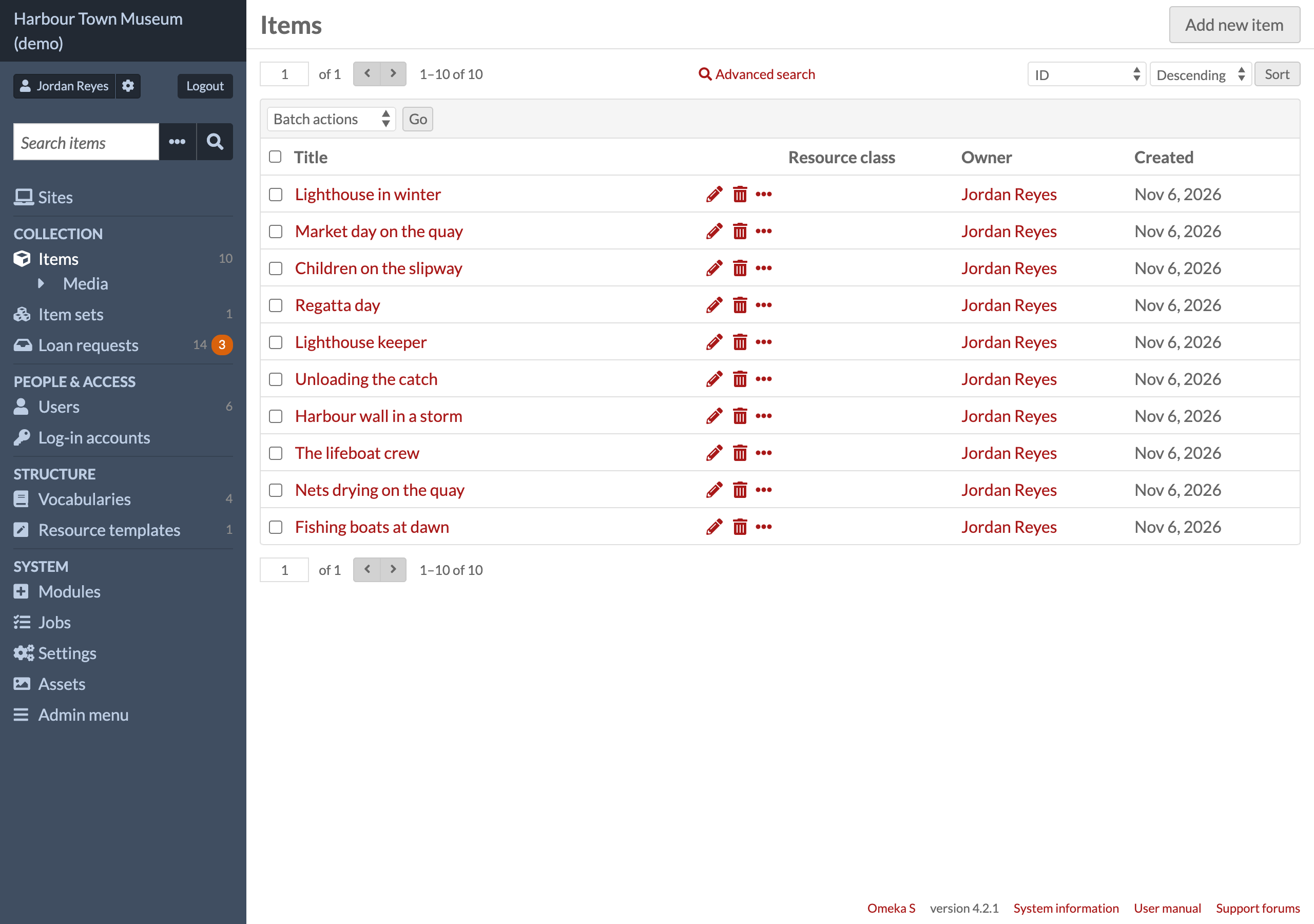
Admin Menu Editor is an Omeka S module to customize the admin left menu (the admin sidebar navigation): make your own groups and put them in order, move, rename, hide or re-icon any entry, add links of your own (a page of the site or another address), and choose which roles see each group or entry. It works on the menu as Omeka and every other module have made it, shows where each entry comes from, and can show numbers beside entries (how many records, what is waiting). Turn it off and Omeka's own menu is back.
- Omeka S 4.x · no other module required
- Licence: GPL-3.0-or-later (see
LICENSE) - Issues and questions: https://github.com/phumraphee/AdminMenuEditor/issues
Screenshots
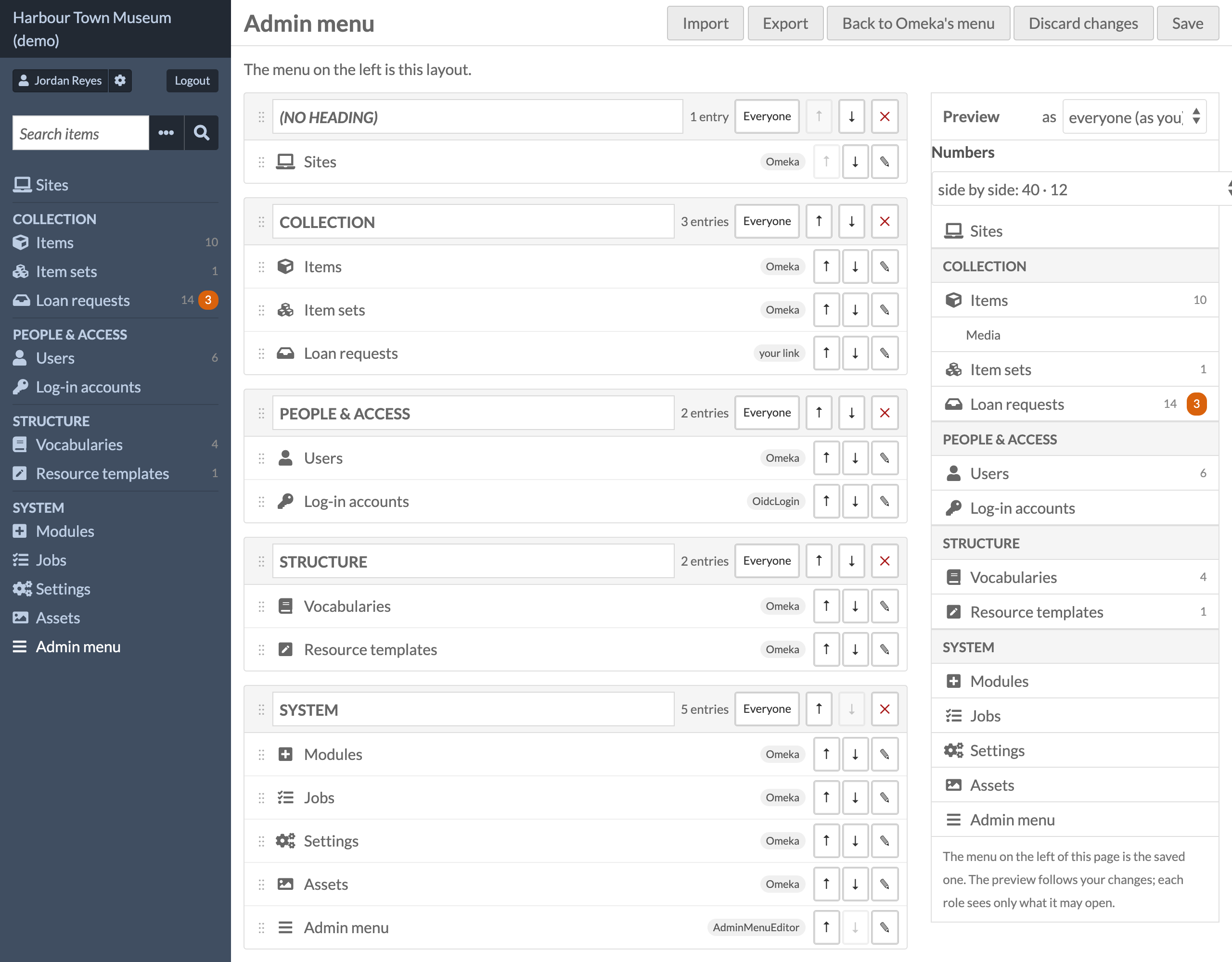
The editor — groups and entries in order, where each entry comes from (Omeka, a module, or your own link), who sees each group, and a live preview with the numbers.
Where to find it
Admin → Admin menu (/admin/admin-menu, in the ADMIN part of the left menu), or the module's Configure button.
Global administrators only.
Install
- Unzip into
modules/AdminMenuEditor(the folder name must stay exactly that). - Admin → Modules → Admin Menu Editor → Install. To update, replace the folder and press Upgrade.
Installing creates one table, admin_menu_editor_log (the change log). Until a layout is saved
the menu is Omeka's own.
What it does
The module works on the menu as Omeka and every other module have made it, and only arranges it:
- It comes last. Modules that add, move or hide entries in their configuration, while the page is made, or with a script in the page have all had their turn; the menu is drawn from what is there.
- An entry the viewer may not open is never shown, whatever the layout says (the same ACL check as Omeka's own menu).
- Entries the layout does not know yet — a module installed later — appear in Unsorted at the end. Nothing is lost.
- The editor shows where each entry comes from (Omeka, or which module) and whether another module hides it ("hidden by …", or "hidden elsewhere" when the module cannot be named). Showing such an entry is an explicit override in this layout only, with a warning, and one click drops it. Other modules' settings and code are never changed.
- A link of your own to a page that no longer exists is greyed in the editor and left out of the menu.
- No layout saved, or the module turned off: Omeka's own menu, unchanged.
Also: live preview (as any role), export / import of the layout as JSON, "Back to Omeka's menu", and a change log (who, when, what; the last 50, each one can be put back).
Numbers beside entries (off unless you turn them on, entry by entry)
An entry can show up to three numbers, each saying what it counts in its tooltip: its total; a second total that means something else ("12 drafts" beside "40 exhibitions", "75 not yet catalogued" beside "310 books"), shown only with the total; and what waits there, in orange. How they look is one choice for the whole menu (editor → Preview → Numbers): side by side ("40 · 12"), the second number in words under the name, or the second number in an outlined pill.
- Total (grey): how many records the entry's page lists. Omeka's own lists — Items, Item sets, Media, Vocabularies, Resource templates, Users (with the entry's own query: Guest's "Guests" counts users with role guest), Assets, Sites — are counted through Omeka's API as the person viewing, so someone who cannot see private records gets the public count. Any other entry (a module's page, a link of your own) gets its total from a provider, below.
- What waits (orange, only when more than none): Omeka knows nothing of it; a provider says it.
Providers, either of two ways. An event, from another module:
php
  // in your module's attachListeners()
  $sharedEventManager->attach('AdminMenuEditor', 'admin_menu_editor.badges', function ($event) {
      if (in_array('admin/my-page', $event->getParam('countKeys'), true)) {
          $event->getParam('counts')['admin/my-page'] = ['count' => 120, 'title' => 'records'];
      }
      if (in_array('admin/my-page', $event->getParam('countKeys'), true)) {   // a second total
          $event->getParam('also')['admin/my-page'] = ['count' => 9, 'title' => 'drafts'];
      }
      if (in_array('admin/my-page', $event->getParam('keys'), true)) {
          $event->getParam('waiting')['admin/my-page'] = ['count' => 3, 'title' => 'to review'];
      }
  });
The key is the entry's key as the editor shows it (its route, plus controller/action/query; a
link of your own is link:<id>). Answer for the person viewing, and leave the key out for
someone your page would not show the number to. Or, for a site's own tables, a count query in
config/local.config.php (the site administrator's file, never a page):
php
  'admin_menu_editor' => [
      'count' => [
          'link:requests' => ['sql' => "SELECT COUNT(*) FROM my_requests", 'title' => 'requests',
                              'roles' => ['global_admin', 'editor']],      // only these roles see it
      ],
      'also' => [
          'link:requests' => ['sql' => "SELECT COUNT(*) FROM my_requests WHERE paid = 1", 'title' => 'paid'],
      ],
      'waiting' => [
          'link:requests' => ['sql' => "SELECT COUNT(*) FROM my_requests WHERE status = 'new'", 'title' => 'new requests'],
      ],
  ],
A query may use :viewer (the viewer's user id) and :role; when it answers NULL that person is
shown no number. An event's answer for a key wins over the configuration's.
Numbers are kept for 60 seconds in each person's own session. A failing provider is logged and
left out; the menu never breaks on a number. The response header X-Admin-Menu-Ms says how long
the menu took ("counted" or "cached").
Icons
The icon picker has two parts.
- Omeka's icons: the ones Omeka's admin already ships (Font Awesome 5 Free). Omeka's icon style sheet also names glyphs of fonts it does not load, which would draw nothing, so the editor tries every name once per page in the browser (each drawn on a canvas in its own font and again without it) and lists only the ones that draw. A site that loads more or other icon fonts gets those too.
- More icons: Font Awesome Free 5.15.4 Brands (brand logos and a few others, 456 icons), shipped
in this module (
asset/fonts,asset/css/more-icons.css; nothing is loaded from elsewhere). The editor loads them; the menu loads them only when the saved layout uses one of them, so a menu without them stays as light as before.
Search covers both parts. An icon chosen earlier that no font here draws stays in the layout; the editor marks it with "?" and says so in the entry's details.
Licence of the bundled font: Font Awesome Free by Fonticons, Inc. (https://fontawesome.com), fonts
under the SIL OFL 1.1, icons under CC BY 4.0; see asset/fonts/LICENSE.txt. Made from the
@fortawesome/fontawesome-free 5.15.4 package (fa-brands-400.woff2, .woff).
Command line
php modules/AdminMenuEditor/bin/layout.php export [file]
php modules/AdminMenuEditor/bin/layout.php import <file>
php modules/AdminMenuEditor/bin/layout.php reset
How it works
view.layout at the lowest priority builds the menu (src/Stdlib/Builder.php) from the navigation
containers whose names start with Admin (AdminSite, AdminResource, AdminGlobal,
AdminModule, and e.g. Guest's AdminUsers); at EVENT_FINISH the inside of <nav id="menu"> is
replaced. Omeka's layout template is not overridden. asset/js/menu.js runs after other modules'
scripts and puts their script-added entries in the place the layout keeps for them (or in Unsorted).
Entries are identified by route (plus controller, action, params and query), so a translated or renamed label does not lose its place.
Uninstall
Drops admin_menu_editor_log and the saved layout. The menu is Omeka's own again; nothing of
any other module is touched. Export the layout first to keep it.
Requirements
Omeka S 4.x (tested on 4.2.1 with PHP 8.4 and 8.5). No other module.
Licence
Copyright (C) 2026 Phumraphee Sae-tang
This program is free software: you can redistribute it and/or modify it under the terms of
the GNU General Public License as published by the Free Software Foundation, either version 3
of the License, or (at your option) any later version. See LICENSE.
The bundled icon font is Font Awesome Free by Fonticons, Inc. (fonts: SIL OFL 1.1, icons:
CC BY 4.0); see asset/fonts/LICENSE.txt.